CLIENT COMMUNICATION · B2B AGENCIES
Agency client communication and reporting tools: how to choose
Compare eight agency tools for client updates, feedback, and reporting. Choose a small stack, test it with one client, and use a practical pilot checklist.
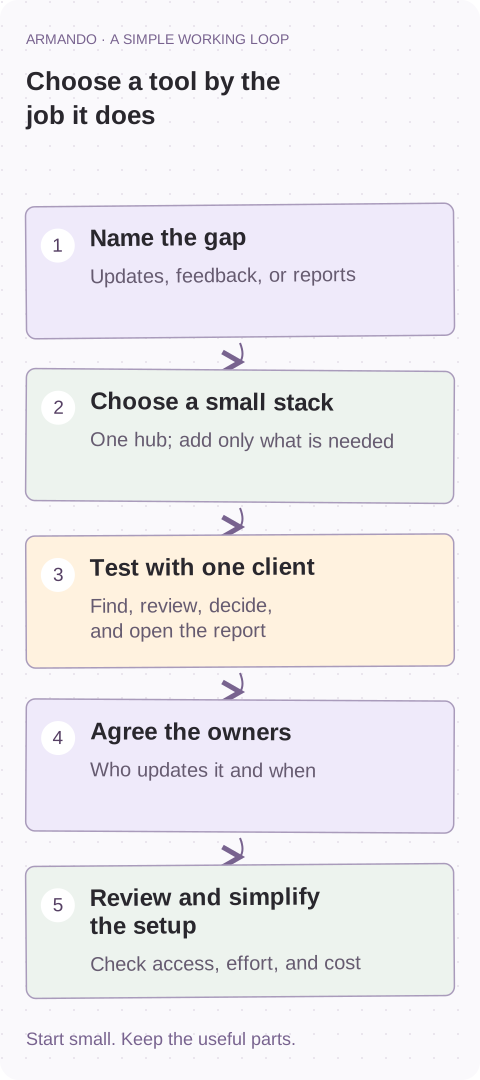
The client asks for the latest update. Someone searches email. Someone else sends a dashboard. The approval is in a different thread. All the information exists; finding it is the work.
Another app can help. It can also give everyone another place to forget to update. Before choosing agency client communication and reporting tools, decide where clients should go, what they should find, and who keeps it current.
This is a shortlist, not a league table. The fit assessments below are editorial judgments based on the jobs each product is designed to support. We checked official product and help documentation on 14 October 2026; this is not a hands-on test of all eight tools. Check current plans, permissions, and integrations before buying.
1. Separate updates, feedback, and reporting
These are three different jobs. A project board tells a client what is happening. A review tool keeps comments next to the file being discussed. A performance report helps the client decide what to do next. One product may cover several jobs, but that does not make every part equally useful.
Write down the question clients keep asking. “Where is the latest version?” needs a different fix from “What did our marketing spend achieve?” Pick the biggest recurring gap first.
| Client question | What you need | Who keeps it useful |
|---|---|---|
| What is happening, and what do you need from us? | A current client hub with milestones and decisions. | The named account or project owner. |
| Which version are we reviewing, and who approves it? | Asset-specific feedback and a clear sign-off step. | The delivery owner and one client approver. |
| What changed, and what should we do next? | A report with agreed metrics, context, and next actions. | The person responsible for reporting and interpretation. |
Define the account owner before adding another tool ↗
Start with the basics of client communication and reporting ↗
Fix the workflow before buying another tool ↗
2. Compare eight tools by the problem they address
Use this table to narrow the search. The notes are fit considerations, not claims that a product cannot do anything else. Avoid buying three products to solve one missing weekly update.
| Tool | Useful starting point | What to check in a pilot |
|---|---|---|
| Basecamp | Everyday project updates, discussions, tasks, and files. | Client visibility and whether you need a separate performance report. |
| Teamwork.com | Structured delivery linked to projects, time, and workload. | How little production detail clients need to see. |
| ClickUp | Flexible task, document, form, and dashboard workflows. | Guest permissions and the effort needed to keep the setup simple. |
| Notion | A curated home for briefs, resources, notes, and priorities. | Who updates it, plus page and linked-resource access. |
| ManyRequests | A portal and request queue for repeatable agency services. | Whether real client needs fit your intake and service boundaries. |
| Filestage | File review, version feedback, and approval decisions. | Your file types, reviewer access, and final approval ownership. |
| AgencyAnalytics | Recurring marketing dashboards and reports. | Your actual metrics, accounts, data history, and connection requirements. |
| Looker Studio | Custom reports built around connected data sources. | Connector costs, metric definitions, access, and maintenance. |
3. For everyday updates: Basecamp or Teamwork.com
Basecamp is worth a look when communication is scattered and the client mainly needs discussions, tasks, a calendar, and shared files. Start with a welcome note, current milestones, and one recurring update thread. Decide what the client can see before inviting them. Do not assume project status answers questions about campaign performance.
Teamwork.com is worth evaluating when communication is tightly connected to detailed delivery, time tracking, and workload. Give clients milestones, deliverables, and decisions rather than every internal task. Your internal view may need plenty of detail; the client view usually needs less.
- Open the workspace with a client-access account, not your administrator login.
- Find the current update and one pending decision without explaining where to click.
- Keep internal cost discussions and unrelated client projects out of that view.
4. For a flexible hub: ClickUp or Notion
ClickUp combines tasks, documents, forms, and dashboards. That is useful when your delivery workflow needs several stages and owners. It also gives you plenty of ways to overbuild. Keep the client view focused on active deliverables, next milestones, and input you need. Check guest access and plan costs for your actual setup.
Notion can work as a lightweight client homepage for a consultancy or strategy-led agency. Put the brief, current priorities, meeting notes, and report links together. The weak point is upkeep: a tidy page from last month is still last month’s information.
- For a simple hub, use five sections: overview, this week, decisions needed, resources, and reports.
- Link to the original file rather than uploading a second copy.
- Name a person and update day. Check both the hub and the files it links to.
5. For requests and approvals: ManyRequests or Filestage
ManyRequests is designed around a branded client portal and request workflows. It is a plausible fit for repeatable services such as ongoing design support. Test a real request: does the intake capture the objective, assets, timing, and acceptance criteria? A complicated consulting engagement may need a conversation before it can become a useful request.
Filestage focuses on file reviews and approval decisions. It helps when comments are scattered across email, screenshots, and calls. Test an actual design, video, or document with an external reviewer. Software can organize feedback; it cannot decide which of five disagreeing stakeholders has final say.
- Name the client approver and agree a review deadline.
- Keep file-specific feedback with the version being reviewed.
- Record the approval decision and carry unresolved changes into the next action.
6. For marketing reporting: AgencyAnalytics or Looker Studio
AgencyAnalytics is worth evaluating when recurring marketing reports mean pulling data from several platforms. Test the exact accounts, metrics, and reporting period you need. An integration being listed does not establish that it covers your whole report. Add a short explanation of what changed and what you will do about it.
Looker Studio lets you build custom reports using connected data sources, including Google sources and third-party connectors. It can suit a team with someone who owns metric definitions and dashboard maintenance. Include connector fees and troubleshooting time in the budget. A low software bill is not the same as a low reporting cost.
Both routes still need interpretation. A dashboard can show a change. Your agency needs to explain whether it matters, what the evidence supports, and what decision follows.
7. Choose a small stack your team can maintain
For straightforward project work, evaluate a simple hub first. Add a reporting layer only when there is a real reporting need. For complex delivery, a structured project system may be more useful, with a short client-facing summary over the top.
For subscription services, test request intake first; add proofing if version feedback is a recurring bottleneck. For consulting, a curated hub may be enough. These are starting hypotheses. Your existing setup may already do the job once someone owns it.
Agree channel rules during onboarding. For example: email notifies, the hub holds context, the review tool holds asset feedback, and the report explains results. State where urgent issues go and the response time you have actually agreed.
Agree the communication rules in your client onboarding ↗
Keep owners, decisions, and next actions in the account plan ↗
COPY & ADAPT
CLIENT COMMUNICATION AGREEMENT
Updates live in: [one location]
Updated by / when: [owner / cadence]
Decisions needed: [owner / deadline]
Asset feedback and approval: [location / approver]
Reports and commentary: [location / owner]
Urgent issues: [channel / agreed response time]
Backup if the owner is away: [person]
8. Run a two-week pilot with one client
Use an active project, not an empty demo. Agree a small pilot with the client and ask them to do the five tasks below. Watch where they need help. If every step needs a call, simplify the setup before adding seats.
Record a baseline from your own team: time spent preparing an update, repeat questions about status, and how often decisions get stuck without an owner. Repeat the check during the pilot. Two weeks is a usability test, not proof that a tool reduced churn.
Also test separation between clients, mobile access, linked-file permissions, and exports. Compare the full cost: team seats, client access, data connectors, storage, branding, setup, and ongoing administration. Make sure someone can maintain the system when its original champion is away.
- Find the latest update.
- Locate one shared resource.
- Review a deliverable and leave feedback.
- Identify the decision waiting on the client.
- Open the latest report and explain the next action.
COPY & ADAPT
PILOT NOTES — USE YOUR OWN OBSERVATIONS
Client / project: [name]
Problem we are testing: [one recurring gap]
Baseline: [time / repeat question / stalled decision]
Tasks completed without help: [which of the five]
Access or permission issues: [what happened]
Weekly upkeep: [owner / actual effort]
Total cost: [seats + connectors + administration]
Decision: [keep / simplify / stop]
Next review: [owner / date]
9. Keep the monthly report useful
Lead with what happened, why it matters, what you did, and what happens next. Use agreed business outcomes, not every number a dashboard can display. Explain tracking gaps and uncertainty. More traffic may be interesting; qualified opportunities may be the thing the client asked you to improve.
An illustrative update could read: “Traffic rose, but qualified enquiries were flat. We have not yet confirmed whether the new landing page is the cause. This month we will review the enquiry path; Alex owns the check, and we will discuss the result on Friday.” The names and situation are examples, not client results.
Armando is where we help agencies turn these routines into an account-management process: shared client context, playbooks, owners, and follow-through. We are not treating it as a substitute for specialist proofing or marketing-data connectors. Start by fixing the process around the tools you already have.
Build a simple account-management rhythm around your tools ↗
Use client feedback and unresolved issues in your retention routine ↗
Start with one account this week
- Name the one communication problem you want to solve.
- Shortlist tools for that job; avoid replacing the whole stack at once.
- Run the five-task pilot and test client isolation and permissions.
- Assign an update owner and backup, then review upkeep and total cost.
Common questions
What are the best tools for agency client communication and reporting?
The right shortlist depends on the job. Basecamp, Teamwork.com, ClickUp, and Notion can support project updates or a client hub; ManyRequests suits request-based work; Filestage focuses on reviews; AgencyAnalytics and Looker Studio address reporting. Test the fit with your own client workflow rather than choosing a universal winner.
Can one agency tool handle updates, feedback, and reporting?
Some products cover several jobs, but depth and plan access vary. Start with the largest gap and add a specialist layer only when the current setup cannot meet a real requirement.
What if a client does not want another portal?
Keep a familiar notification channel and link directly to the relevant update or approval. Ask what they can realistically use, test it on mobile, and agree where the latest information lives.
Should clients see the internal project board?
Usually they need a smaller view of milestones, deliverables, blockers, and decisions. Test permissions as a client and confirm that internal costs, private discussions, and other accounts stay private.
How do we know whether a client portal is helping?
Compare your own baseline with the pilot: can clients find updates and decisions without help, are repeated status questions falling, and is upkeep manageable? Do not infer revenue or retention gains from a short usability test.