CLIENT COMMUNICATION · B2B AGENCIES
How to fix scattered client updates, feedback, and reports at your agency
Organize agency client communication with one starting point, weekly updates, clear approvals, and useful reports. Includes copyable templates and pilot steps.
The campaign update is in email. The numbers are in a spreadsheet. The approved design is somewhere in a chat thread. None of those tools is necessarily broken. The handoff between them is.
To organize agency client communication and reporting, agree where information belongs, who updates it, and how a decision becomes final. Then make those rules easy for the client to follow.
Here is a practical setup you can pilot with one account. Use the tools you already have until a recurring gap gives you a reason to add something else.
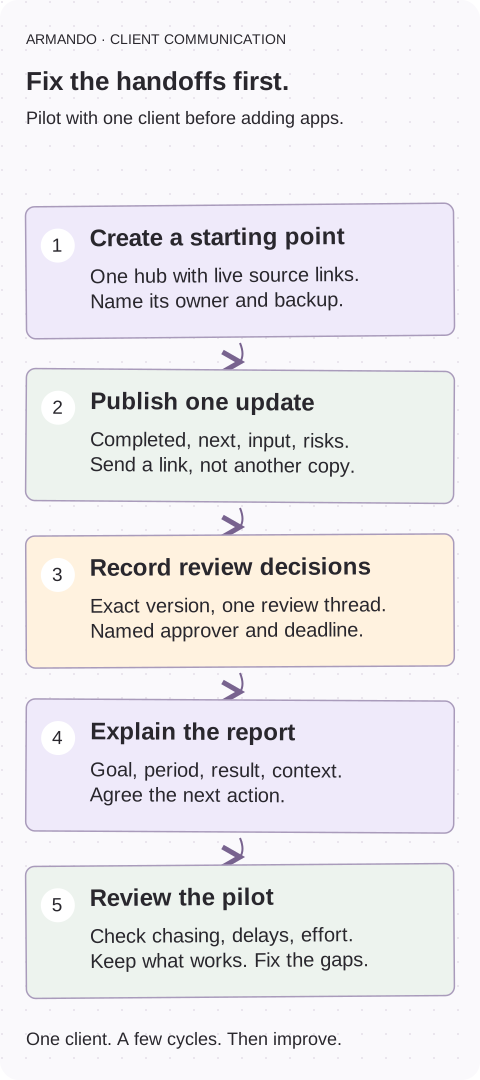
1. Create One Client-Facing Starting Point
A client hub should answer four questions without requiring a meeting:
This can be a shared workspace, a client portal, or a well-structured page in an existing project management tool. The hub does not have to store every file. It should point to the right version.
Start with the active engagement. You do not need to migrate years of old files to make this week’s update easy to find.
Understand how updates, approvals, and reports fit together ↗
Make account ownership explicit ↗
- What is happening now?
- What needs my attention?
- Where are the latest deliverables?
- How are results tracking against our goals?
Build a repeatable hub structure
Give every client the same basic navigation:
Link to live source documents rather than uploading copies that can become outdated. Keep internal notes, margin information, and unfinished discussions outside the client-facing area.
Assign one account owner to maintain the hub. A shared location without an accountable owner can become another abandoned folder.
| Section | What belongs there |
|---|---|
| Overview | Goals, scope, key contacts, and communication expectations |
| Current work | Active deliverables, owners, milestones, and status |
| Updates | Dated summaries of progress, risks, and next steps |
| Reviews and approvals | Items awaiting feedback, deadlines, and final decisions |
| Reports | Performance dashboards, reporting periods, and commentary |
2. Establish a Consistent Update Cadence
A hub reduces searching. A cadence reduces uncertainty.
Choose a rhythm based on the engagement. A fast-moving launch might need twice-weekly updates; an ongoing retainer might work with a weekly summary and monthly performance review.
Publish each update in the hub, then send a short notification linking to it. Avoid distributing slightly different versions across email, chat, and slide decks.
Use a standard update format
Keep routine updates short and decision-oriented:
Replace vague requests such as “Please review when possible” with “Please approve the landing page headline by Thursday so development can begin Friday.”
Agree on an urgent-contact route, too. Routine updates belong in the hub; a launch-blocking issue should trigger direct outreach.
- Completed: What moved forward since the last update.
- Next: What the team will work on before the next update.
- Needs your input: Specific questions or approvals, with deadlines.
- Risks: Blockers, their likely impact, and proposed action.
- Results: Relevant performance changes, with links to the report.
COPY & ADAPT
WEEKLY CLIENT UPDATE
Date / account owner: [date / name]
Completed: [work and why it matters]
Next: [priority / owner / date]
Needs your input: [specific decision / approver / deadline]
Risk: [impact / proposed action]
Results: [report link / period / important change]
3. Centralize Feedback Around the Deliverable
Feedback gets fragmented when clients can comment anywhere but no one knows which channel contains the final instruction.
Set one review location for each deliverable. That might be comments in a shared document, an annotated design file, or a dedicated proofing tool.
The rule is one authoritative feedback thread per deliverable—not necessarily one application for every file type.
For each review, identify:
If feedback arrives by email or during a call, record the decision in the review location and ask the client to confirm it. Do not leave the production team to reconcile contradictory instructions.
Use explicit statuses such as “Ready for review,” “Changes requested,” and “Approved.” Silence should not count as approval unless your agreed process specifically defines it that way.
- The exact version being reviewed.
- The person responsible for consolidating client feedback.
- The approval deadline.
- The person authorized to give final approval.
COPY & ADAPT
REVIEW AND APPROVAL RECORD
Deliverable / version: [exact file or link]
Feedback location: [one thread]
Feedback consolidated by: [person]
Final approver: [person]
Review deadline: [date]
Decision: [changes requested / explicitly approved]
Next action: [owner / date]
4. Connect Reports to Decisions
A dashboard alone does not explain whether the engagement is working. Clients need context: what changed, why it matters, and what you recommend doing next.
Put reporting links inside the hub and use a consistent commentary structure:
Define metrics, date ranges, and data sources. Label refresh timing so clients do not mistake delayed data for current performance.
Where possible, connect reports to source systems rather than manually copying numbers. However, verify integrations, permissions, and metric definitions before treating a connected dashboard as authoritative.
Automate the copying where it helps. Keep a person responsible for checking and explaining the result.
Use reporting to prepare useful QBR decisions ↗
- Goal: The business outcome being measured.
- Result: Performance for the defined reporting period.
- Interpretation: Likely drivers and relevant limitations.
- Action: The next change, test, or decision.
5. Decide Whether a Hub Is Enough
Start with the simplest setup that supports your workflow. Add specialist tools when a recurring problem justifies the extra cost and administration.
A hub alone is often sufficient when
Your client roster is manageable, deliverables are straightforward, and reporting involves a small number of stable sources. Existing document comments may handle reviews adequately, while a linked monthly report provides enough visibility.
Add reporting software when
Your team repeatedly combines data from multiple platforms, manually rebuilds similar reports, or needs consistent dashboards across many accounts.
Evaluate source coverage, refresh frequency, metric customization, client access controls, and maintenance effort—not just visual presentation.
Add proofing software when
Reviews require frame-specific video comments, precise visual annotations, version comparisons, multiple approval stages, or a reliable approval history.
Keep the hub as the starting point and link directly to the relevant proof. Clients should not need to guess where a review happens.
Roll Out the Workflow Before Expanding the Stack
Pilot the system with one client. Move active work first, explain the communication rules, and review the process after a few update cycles.
Track practical indicators: fewer status-chasing messages, faster approvals, less report preparation time, and fewer version disputes. Use those results to identify what still needs fixing.
You will still send emails. The useful change is that everyone knows where the current update, decision, and report live.
Write down a baseline before the pilot. Count repeated status questions, record report-preparation time, and note how long approvals take. Compare the same measures after a few cycles. A short pilot shows whether the workflow is easier to use; it does not prove a churn or revenue improvement.
Choose a tool using the five-task client pilot ↗
Start with one account this week
- Create one client-facing starting page with current work, decisions, reviews, and reports.
- Agree an update owner, cadence, backup, and urgent-contact route.
- Name the reviewer and approver for the next deliverable; record its version.
- Measure status chasing, approval delays, and report effort before and after a few cycles.
Common questions
How do we organize scattered agency client communication?
Start with one client hub that links to current work, updates, review threads, and reports. Assign an owner and agree the update cadence, approval rules, and urgent-contact route. Pilot it on an active account.
Does everything need to live in one app?
No. One starting point can link to live source documents, reviews, and reports in other tools. The important part is that the current version and authoritative decision are easy to find.
What should we do with feedback that arrives by email or on a call?
Record it in the agreed review location, tie it to the exact version, and ask the client to confirm the decision. Resolve conflicting instructions before the production team acts.
How often should an agency send client updates?
Agree a cadence that fits the work. A weekly retainer update or more frequent launch updates are starting options, not universal rules. Escalate urgent blockers through the agreed direct-contact route.
When should we add reporting or proofing software?
Add it when a recurring reporting or review problem cannot be handled reliably by the current setup. Test the specific metrics or file-review requirements, client access, and maintenance effort before rolling it out.