CLIENT COMMUNICATION · B2B AGENCIES
What is agency client communication and reporting?
Understand agency client communication and reporting: updates, feedback, approvals, shared files, and results. Learn what belongs where and who owns it.
“Can you send the latest version?” It is a small question. Answering it should not take an account manager, a designer, and a search through last week’s emails.
That is where agency client communication and reporting starts. The client knows what is happening, what needs their input, and what the work is achieving. Your team knows which decision is current.
You can build that process with tools you already have. First, separate the information people need from the channels you happen to use.
Communication and Reporting: Related, but Different
Client communication is the exchange that moves work forward: updates, questions, feedback, and approvals. Reporting explains progress and results against the goals you agreed.
You need both. A dashboard cannot ask for approval on the right draft. A stream of status messages cannot explain whether the work is achieving what the client needs.
| Communication asks | Reporting asks |
|---|---|
| What is the agency working on? | What did the agency deliver? |
| What has changed since the last update? | How did that work perform? |
| What feedback or approval is needed? | How do results compare with the agreed goals? |
| Are there any blockers or timeline risks? | What should happen next? |
Project Updates
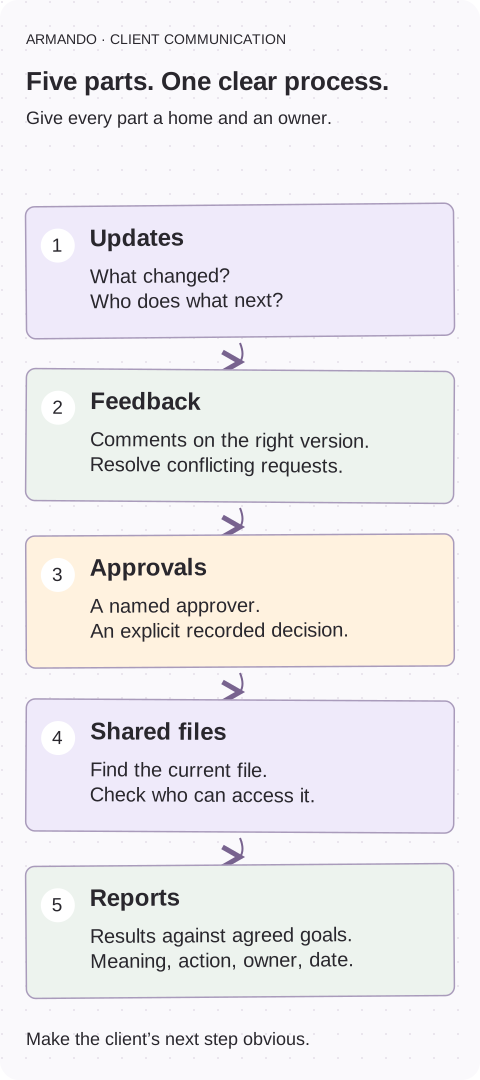
Project updates explain where work stands. A useful update highlights completed work, current priorities, upcoming milestones, and anything that could affect delivery.
For example, “Website redesign is progressing” tells a client very little. A stronger update says: “The homepage design is ready for review. We need consolidated feedback by Thursday to keep development on schedule.”
A useful update gives someone a next action. They should identify who needs to do what and by when, rather than simply list internal activity.
Feedback
Feedback is the client’s input on work in progress. It might involve commenting on copy, marking up a design, or clarifying a campaign message.
Problems arise when feedback arrives through several channels or from stakeholders with conflicting opinions. Agencies can reduce confusion by identifying the right reviewers, specifying where comments belong, and asking clients to resolve conflicting requests.
Discussion is useful. The production team still needs a clear record of what to change.
Approvals
Feedback and approval are not the same thing. A comment like “Looks good” may be encouraging without confirming that a deliverable is authorized for publication.
Approval should be an explicit decision tied to a specific version. Agencies should define who can approve work, what approval means, and when it is required. Recording that decision helps prevent accidental publication and disputes over which changes were accepted.
Performance Reports
Performance reports explain results against the client’s objectives. Depending on the engagement, they might cover qualified leads, advertising efficiency, organic traffic, customer engagement, or delivery milestones.
Useful reports include more than numbers. They explain what changed, why it matters, and what the agency recommends next.
A report should connect metrics to business goals without overstating what the data proves. For example, increased traffic is encouraging, but it does not automatically mean more qualified demand.
Reporting Dashboards: A View of Performance
A reporting dashboard displays metrics, often pulled from connected analytics, advertising, or other business systems.
Its main job is to show how results are changing. Clients can see relevant trends and results without asking the agency to retrieve every number manually.
However, dashboards still need context. Clear metric definitions, date ranges, data freshness, and written interpretation help clients understand what they are seeing.
Proofing Tools: A Place to Review and Approve Work
Proofing tools support feedback on deliverables such as designs, documents, videos, and web pages. Features may include annotations, version comparisons, review deadlines, and approval records.
Their primary purpose is precise review and documented decisions. Comments stay attached to the relevant asset rather than becoming detached instructions in an email thread.
How These Pieces Work Together
Consider an agency launching a paid campaign. The client portal holds the timeline and weekly updates. A proofing tool captures feedback and approval on ad creative. Shared storage contains approved assets. Once the campaign launches, a dashboard tracks performance, while a written report explains results and recommended adjustments.
The agency does not necessarily need four separate products. It needs clear responsibilities, reliable information, and an obvious path from update to action.
This is an illustrative campaign workflow, not a claim about results from a particular client. The important part is the handoff: the approved version, the decision, and the next owner travel with the work.
Start With the Process, Then Choose the Tools
Before choosing software, define what clients need to know, how often they need updates, who provides feedback, and who approves work. Then identify where information currently gets lost.
Fix scattered updates, feedback, and reports step by step ↗
Compare agency tools once you know the gap ↗
COPY & ADAPT
CLIENT COMMUNICATION BASICS
Client goal: [what success means]
Latest update: [location / owner / date]
Feedback: [deliverable version / review location]
Approval: [named approver / decision / date]
Report: [period / source / what it means]
Next action: [owner / date]
Start with one account this week
- Pick one active client and find the latest update, feedback thread, approval, and report.
- Check whether each has a named owner and current version.
- Ask whether the client can find the decision waiting on them.
- Use the workflow guide to fix the first missing piece.
Common questions
What is the difference between client communication and reporting?
Communication keeps work moving through updates, questions, feedback, and approvals. Reporting explains progress and results against agreed goals, with context and next actions. Neither replaces the other.
Is a client portal the same as a reporting dashboard?
No. A portal gives clients a place to find engagement information. A dashboard presents metrics. The portal can link to a dashboard, but the data still needs definitions, date ranges, and interpretation.
Does a small agency need specialist communication software?
Not always. A current shared page, clear document comments, and a useful report may be enough. Define owners and the workflow before deciding which missing job needs a new tool.
What should a client update include?
Explain what moved forward, what happens next, what needs the client’s input, and any risks or relevant results. Give decisions an owner and deadline.